
The ticket broker API and MCP for inventory tracking, sold data, and alerts
A ticket data API for brokers. Pull the tracked primary inventory and ticket resale data that power Flare, from Ticketmaster, AXS, Tickets.com, and StubHub, into your own scripts and spreadsheets. Or connect your AI agent to Flare with MCP and ask about your events in plain English.

A ticket data API you read, write, and plug into anything
Ticket resale data and primary inventory come from the same engine behind Flare, the ticket broker software thousands of resellers use. It is exposed as plain JSON so your own tools can read the market, write your alerts, and automate the rest.
Read the market in one call
- Event analytics: inventory now and 24h, 7d, 30d ago
- Section-level inventory and pricing
- Real-time seat-level Ticketmaster availability on Advanced
- Sold data from Vivid Seats, listing trends from StubHub
Write your favorites and alerts from code
- Favorite events by ID, or by name, date, and venue
- Drop and low alerts on Ticketmaster and AXS
- Price and peak alerts on StubHub and TickPick
- One feed of every alert that fired
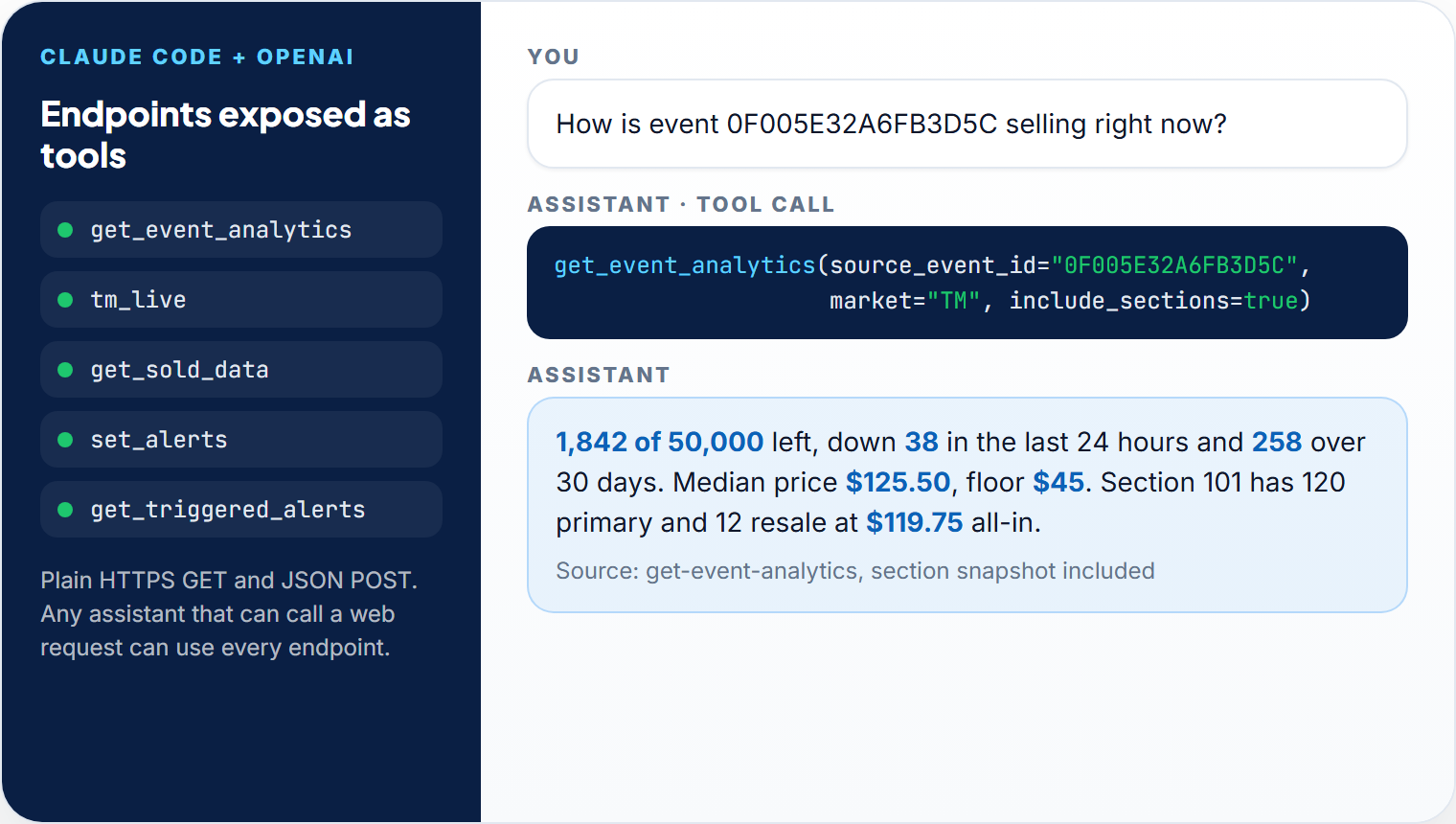
Plug it into your scripts or your AI agent
- Plain JSON over HTTPS, no SDK required
- A Python example on every endpoint
- MCP for Claude Code, Cursor, and Codex
- Your agent asks before it changes anything
Connect your AI agent to Flare
MCP is how AI agents connect to the apps you use. In Flare, open the account menu and click Connect your Agent. Copy the one message it shows and paste it into Claude Code, Cursor, Codex, or another AI agent. The agent sets itself up.
- Ask in plain English to check your watchlist, look up an event, or pull its sold data
- Have it favorite events, set alerts, and turn on sold-data tracking, after it asks you first
- It works in your own account, with the same plan features and caps as the dashboard
- Each connection has its own private key, and you can revoke it in Flare at any time
# In Flare: account menu, Connect your Agent
# Copy the message, paste it into your agent, then ask:

> What's on my watchlist this week?

> Which of my favorites moved the most overnight?

> Show me the Vivid Seats sold data on this event.

> Favorite every upcoming show at this venue.

> Put a drop alert on Section 104 for this show.
  I'm about to create a drop alert on Section 104.
Want me to go ahead?A ticket data API built around how brokers actually buy
Seventeen endpoints, one token. Read tracked inventory and pricing, pull sold comps, and manage favorites and alerts, all in the same JSON format. Every endpoint comes with Expert and up except TM Live, which comes with Advanced. Tags show the daily limit from Expert to Advanced.
Event Analytics & Inventory Tracking
Ticketmaster, AXS, Tickets.com, and StubHub inventory now and 24h, 7d, and 30d ago, plus capacity and min, median, average, and max price, in one call.
100 to 10,000 calls/daySection-Level Inventory & Pricing
Primary and resale counts per section with the lowest primary and all-in price, plus AXS section sold-out status.
Ticketmaster + AXSTM Live: Real-Time Seat Data
Ticketmaster availability fetched the moment you ask: Ticketmaster's own section and offer data, or seat-level availability merged with prices.
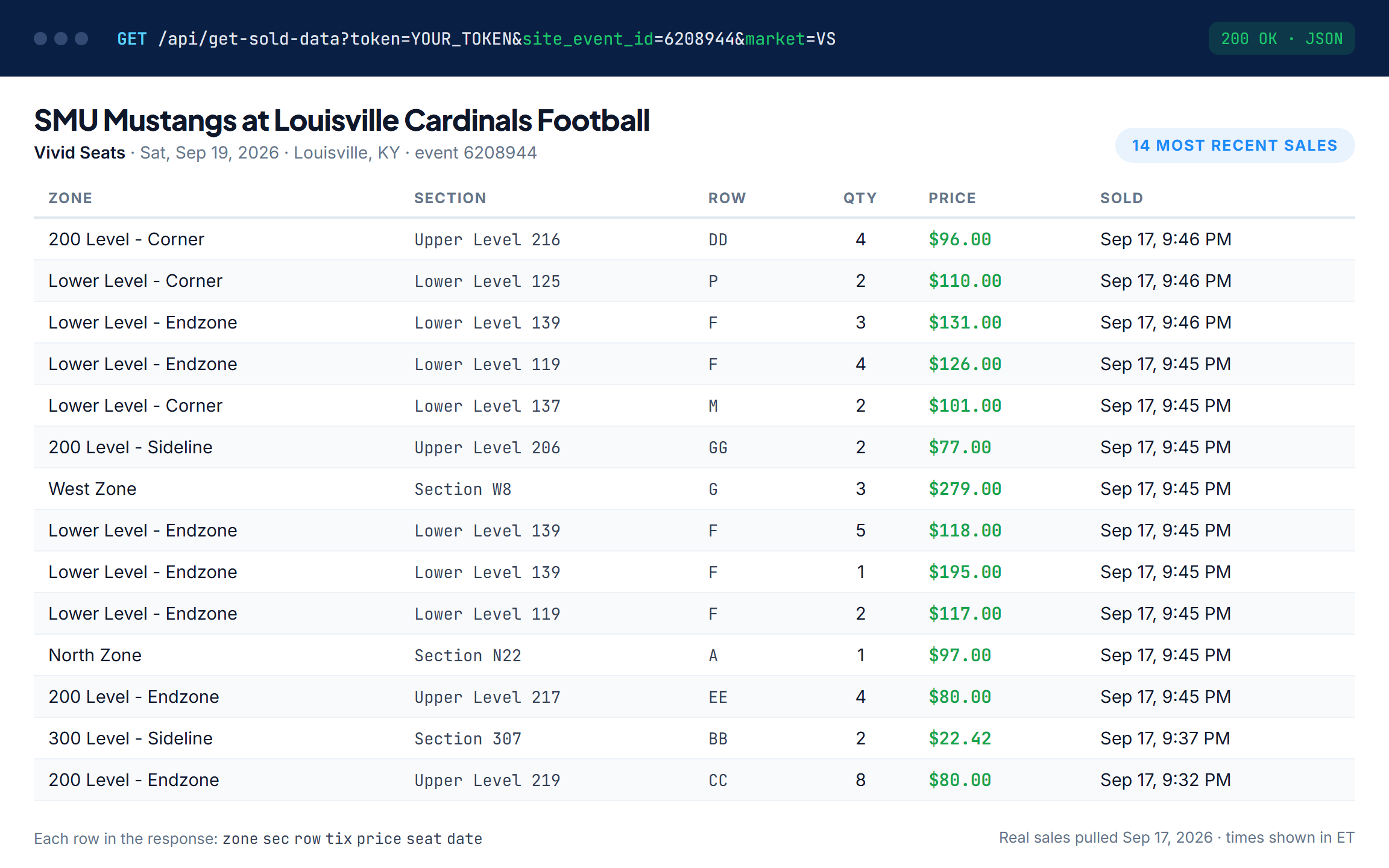
Advanced: 500 weighted calls/dayVivid Seats Sold Data
Individual sales by zone, section, row, quantity, price, and date, so you price with real numbers, not guesses.
25 to 1,000 calls/dayListing Trends & Inventory History
Daily StubHub listing counts with average, min, and max price, and a daily inventory series for the primary events you track.
Expert and upEvent Catalog & Top Moving Events
The Ticketmaster and AXS catalog filtered to events added since a date, plus the day's biggest inventory movers, built for a once-a-day pull that can take a minute or more.
1 to 5 calls/day eachFavorites Sync
Favorite Ticketmaster and AXS events by ID or by name, date, venue, and market. Favorite StubHub and TickPick events by ID.
100 to 500 writes/day eachDrop, Low, Price & Peak Alerts
Create and update alerts from code, target sections, and filter StubHub and TickPick listings by fees, pairs, parking, piggyback, platinum, limited view, and ADA.
100 to 500 writes/day eachTriggered Alerts Feed
Everything that fired in the last 1 to 168 hours, up to 500 rows a call, ready to relay to Slack, Discord, or your POS.
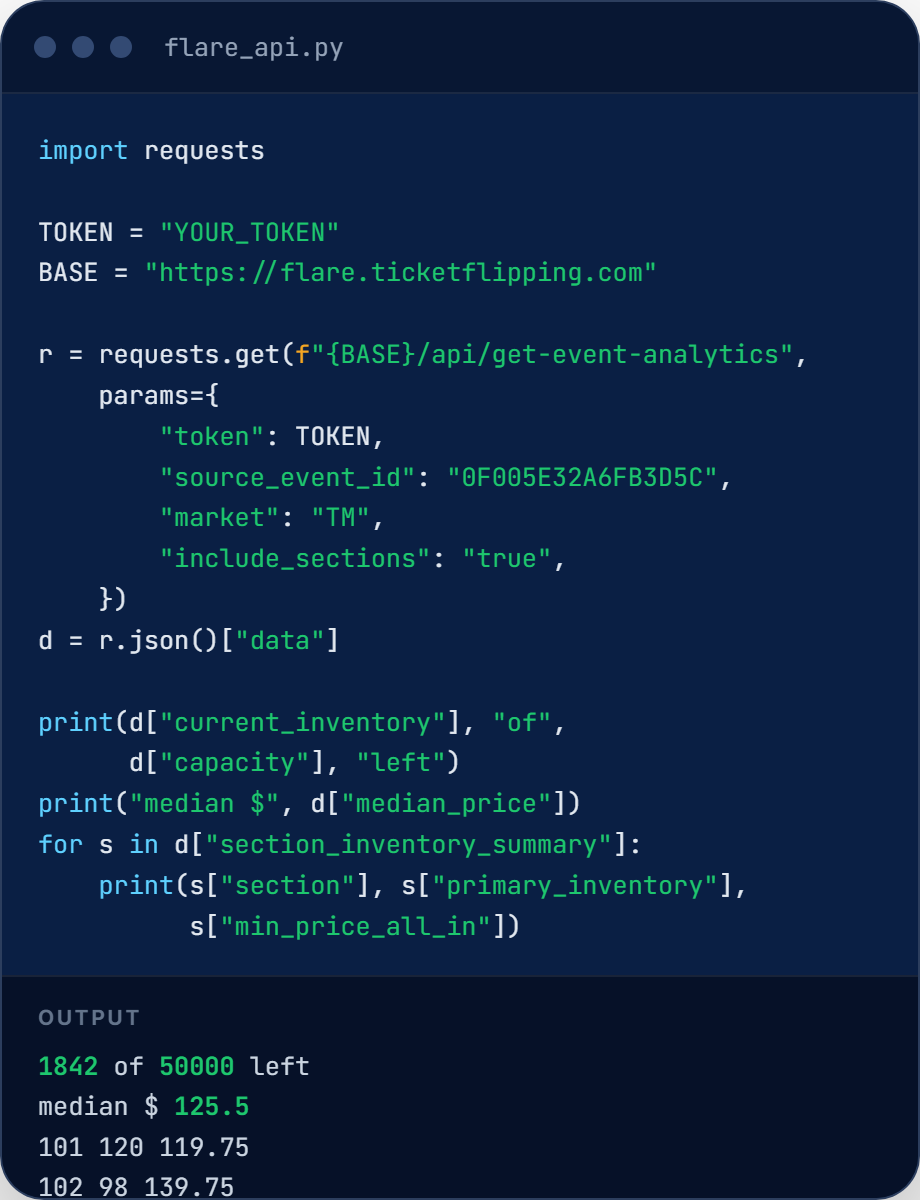
100 to 2,000 calls/daySee how any event is selling in one request
Send one Ticketmaster, AXS, Tickets.com, or StubHub event ID and get back the numbers a buying decision needs.
- Current inventory and the count 24 hours, 7 days, and 30 days ago
- Capacity and min, median, average, and max price
- A per-section breakdown of primary and resale inventory with prices on Ticketmaster and AXS events
- Consistent JSON errors with clear status codes: 400, 401, 403, 404, 429
# base URL https://flare.ticketflipping.com
GET /api/get-event-analytics
    ?token=YOUR_TOKEN
    &source_event_id=0F005E32A6FB3D5C
    &market=TM&include_sections=true

{
  "status": "success",
  "data": {
    "current_inventory": 1842,
    "primary_resale_inventory": 1250,
    "inventory_30d_ago": 2100,
    "inventory_7d_ago": 1950,
    "inventory_24h_ago": 1880,
    "capacity": 50000,
    "min_price": 45.00,
    "median_price": 125.50,
    "max_price": 500.00,
    "avg_price": 150.75,
    "section_inventory_summary": [
      { "section": "101",
        "primary_inventory": 120,
        "resale_inventory": 12,
        "min_primary_price": 129.50,
        "min_price_all_in": 119.75 },
      ...
    ]
  }
}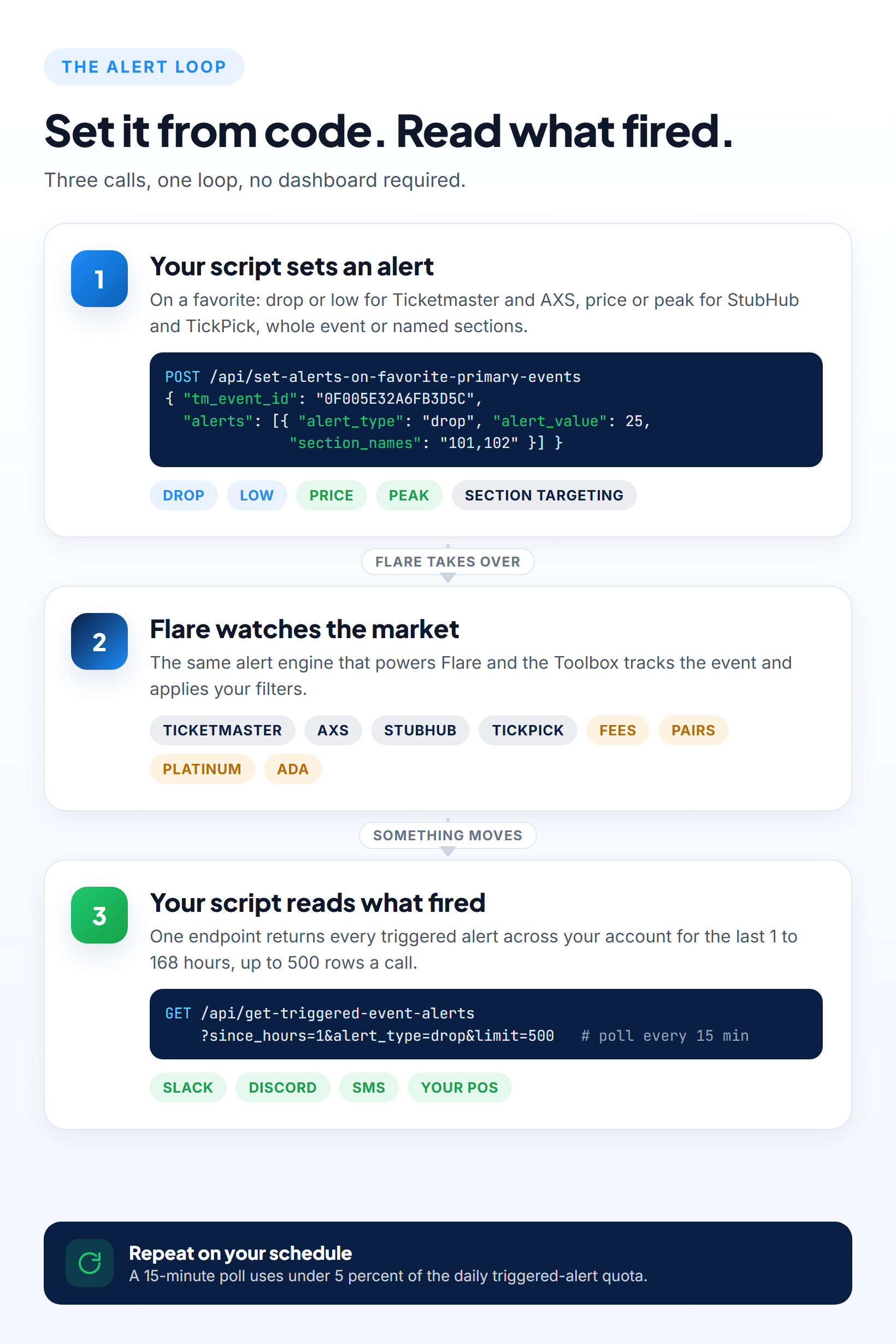
Set ticket price alerts from code, then read what fired
Alerts are the same objects you set in Flare, so a script can create them for every event you favorite, and one endpoint returns everything that triggered across your account.
Vivid Seats sold data: price with real sales, not guesses
Pull individual Vivid Seats sales for the events you track, then build your own comps by zone, section, row, and quantity before you list.
Plug the ticket market into the tools you already use
Every endpoint is a plain HTTPS GET or POST, so anything that can make a web request can use it: a Python script, a spreadsheet, an automation, or an AI assistant. Inside Flare, members can also ask the Ticketflipping AI Assistant.
API access and MCP are included with Expert and up
Pick the plan that fits how many calls you make. Each plan includes everything in the plan before it, and the daily API limits go up with each one. Membership caps on favorites and sold-data tracking still apply. Higher and flexible limits are available for custom packages.
- Everything in Pro
- API Access + MCP
- Event Alerts (Drop, Low, Price)
- 150 Favorites (Tracking + Alerts)
+3 more featuresShow less
- 40 Sold Data Tracking
- Full Price HeatMap
- 20 AI Inquiries/day
- Everything in Expert
- Higher API Limits
- 500 Favorites (Tracking + Alerts)
- 100 Sold Data Tracking
+4 more featuresShow less
- Historical Data for Past Events
- Sold Out Events List
- Top Moving Event Insights
- 50 AI Inquiries/day
- Everything in Enterprise
- Highest API Limits
- TM Live Real-Time Seat Data
- 2,500 Favorites (Alerts)
+3 more featuresShow less
- 200 Sold Data Tracking
- All Top Moving Event Lists
- 50 AI Inquiries/day
Daily API limits by plan
| Endpoint | Expert | Enterprise | Advanced |
|---|---|---|---|
| MCP for your AI agent | Included | Included | Included |
| Event analytics | 100 | 1,000 | 10,000 |
| Sold data | 25 | 250 | 1,000 |
| Triggered alerts feed | 100 | 250 | 2,000 |
| Alert reads, primary and secondary (each) | 100 | 250 | 2,000 |
| Favorites reads, primary and secondary (each) | 100 | 250 | 1,000 |
| Favorite and alert writes (each) | 100 | 250 | 500 |
| Section lookups | 25 | 100 | 500 |
| Inventory history exports | 10 | 50 | 300 |
| Listing trends exports | 3 | 10 | 30 |
| Event catalog | 1 | 2 | 5 |
| Top moving events | 1 | 2 | 5 |
| TM Live (seat-level counts as 3) | Not included | Not included | 500 |
Calls per day. Limits reset every day at midnight UTC.
Ticket broker API questions, answered
What brokers and developers ask before they connect.
Can I get live Ticketmaster availability through the API?
How can I track how many tickets are left on Ticketmaster?
How do I get Vivid Seats sold data for an event?
How do I set a ticket price drop alert from code?
Can I get historical ticket price and inventory data for an event?
Can I get AXS inventory or sold-out status by section?
Which marketplaces does the Ticketflipping API cover?
Can I use it from Claude Code, Cursor, or my own scripts? Do I need to be a developer?
What can my AI agent do in Flare through the MCP?
What are the Ticketflipping API rate limits?
How much does the Ticketflipping API cost, and where are the docs?
Put the data to work
Guides on reading market data, scoring events, and choosing analytics tools, from the team behind the API.

How to Read Secondary Market Data Like a Pro Broker
Listing prices, sold prices, inventory velocity, price trends: here is exactly what the numbers mean and how to use them to make smarter buying decisions every single time.
Read article
What Is a Flare Score? And What Can It Actually Tell You?
The Flare Score measures real local fan demand against available ticket supply, ranked across 57,000+ events. Here is what it tells you, what it does not, and how to use it alongside the Popularity Score.
Read article
Ticket Resale Analytics Software
What resale analytics software should do for a broker, and how Flare covers listing prices, sold data, inventory velocity, and alerts in one place.
Read articleReady to plug the ticket market into your own tools?
Use the Ticketflipping API and MCP to track inventory, price from real sales, and automate your alerts, from your own scripts or your AI agent.