
Ticket broker tools that turn data into profit.
The Flare Event Dashboard and Toolbox Chrome Extension give you event scores, primary and secondary ticket data, sold data, presale codes, and inventory alerts. Everything you need to flip smarter. The Flare Event Dashboard and Toolbox Chrome Extension. Everything you need to flip smarter.
Everything you need to make smarter decisions in the ticket market
The Toolbox Chrome extension overlays primary and secondary marketplaces with the data the pros watch, right on every event page you visit.

Set Event Alerts
Set Drop Alerts, Low Alerts, & Price Alerts and get notified when tickets are selling out or more have been added.

View Remaining Tickets
See how primary and secondary ticket marketplaces are selling, so you can make profitable decisions on every event.

Track Events
Get access to Daily Presale Lists and Codes to find ideal events ahead of time. No more hours doing your own research.

See Sales Data
See exactly how tickets are selling on the secondary market so you can make intelligent decisions every time.
Flare Score
Each tracked music event gets a score from 1 to 100. A 90 means the show ranks above 90% of upcoming tracked music events.
Price HeatMap
Visualize where pricing is moving across the venue. Spot underpriced sections and demand pockets at a glance.
Get started in three simple steps
Install the extension, log in to your Flare dashboard, and start tracking the data your competitors don't see.
Install the Toolbox
Add the TicketFlipping Toolbox Chrome extension and sign in with your membership account in seconds.
Browse any event
Visit a Ticketmaster, AXS or other supported event page. The Toolbox shows remaining ticket counts, a historical sales graph, and secondary market metrics.
Track, alert, and flip
Save events to Favorites and set Drop, Low and Price alerts on Expert and up. Triggered alerts show in the alert bell on every Flare page, on desktop or your phone.
We rebuilt every screen in Flare
Flare is the event dashboard that comes with every TicketFlipping membership. It tracks primary tickets on Ticketmaster, AXS and tickets.com, plus Vivid Seats supply and secondary get-in. Home lists the presales and onsales in the next 48 hours and how your favorite events moved overnight.
- Market Pulse shows the events selling fastest on primary
- Primary and secondary supply and get-in on one event page
- Seat map colored by price, supply or the resale spread
- Works on your phone, in light or dark theme
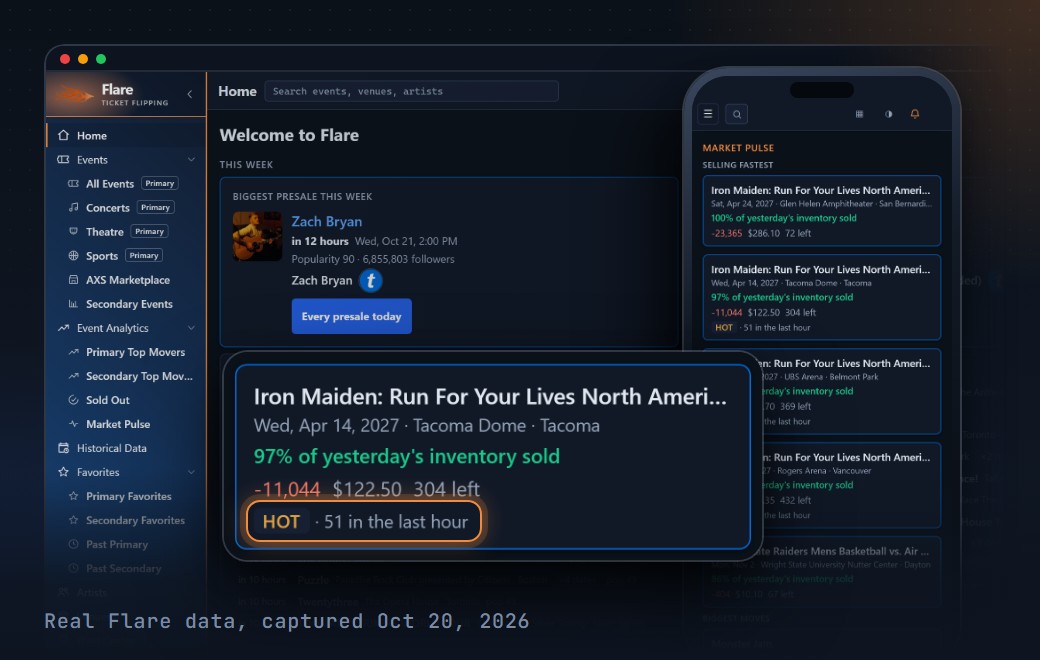
Live data on every event page you visit
Click the Toolbox icon on any supported event page to instantly see remaining tickets, primary and secondary inventory, capacity data, and the AI event score, without ever leaving the tab.
- Primary marketplace ticket counts in real time
- Secondary marketplace sold data overlay
- One-click favoriting and alert setup
- Works on the marketplaces you already use

Check secondary sales and past shows before you price
Stop guessing. Flare shows the Vivid Seats sales it picked up on matching events, each with a confidence label. Historical Data puts a past show's primary and secondary tickets on one chart, so you can see how a similar show sold.
- Track sold data on up to 200 events, by plan
- Secondary sold data from Vivid Seats on Expert and up
- Historical Data for past events on Enterprise and up
- Price HeatMap shows pricing section by section
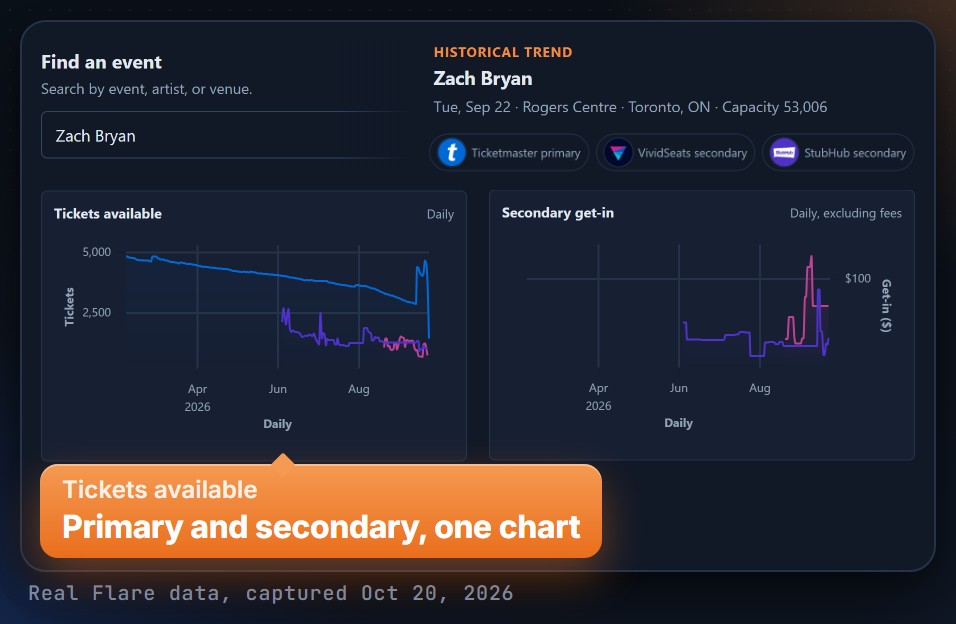
The new Flare puts primary and secondary data side by side
Here are the screens that changed the most. The tag on each card shows which plans have it.
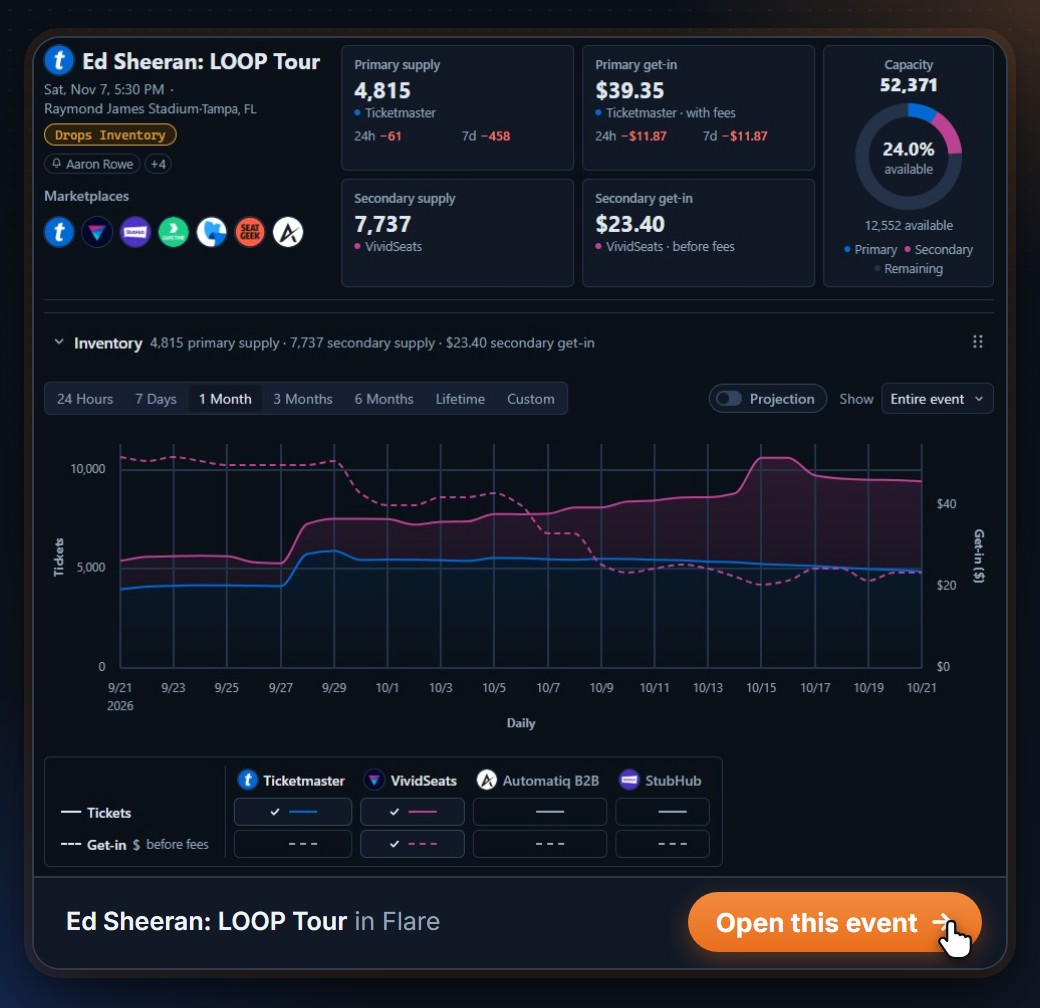
See primary and secondary on one event page
Primary supply and get-in sit next to Vivid Seats supply and secondary get-in, with the venue's capacity. One chart tracks both sides over time.
Secondary side: Expert and up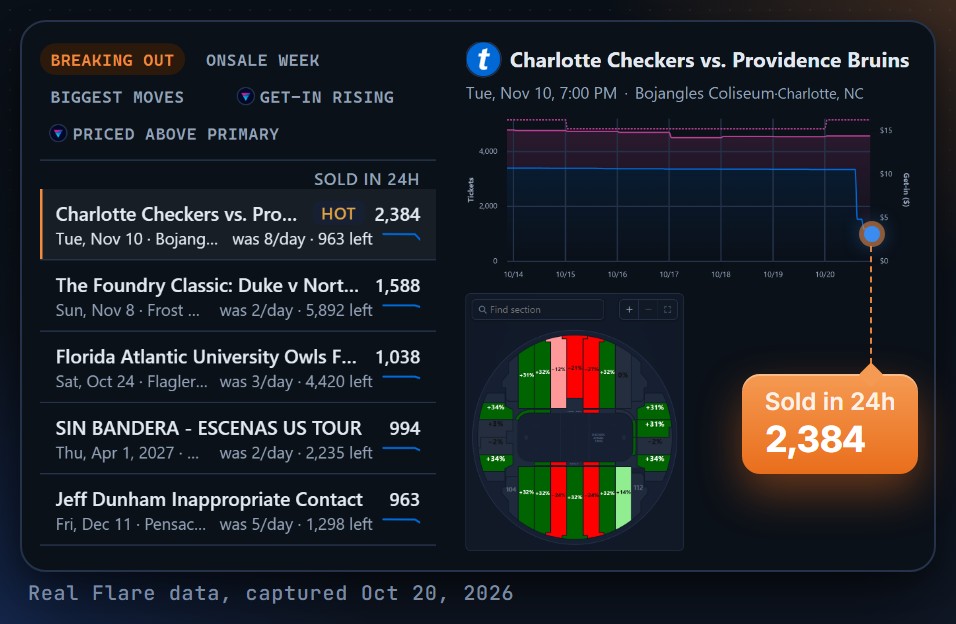
Find the events that sold the most in the last 24 hours
Market Pulse lists the events selling fastest on primary, plus Onsale week and Biggest moves. Click a row to see its chart and seat map.
Pro: 2 lists. Expert and up: every list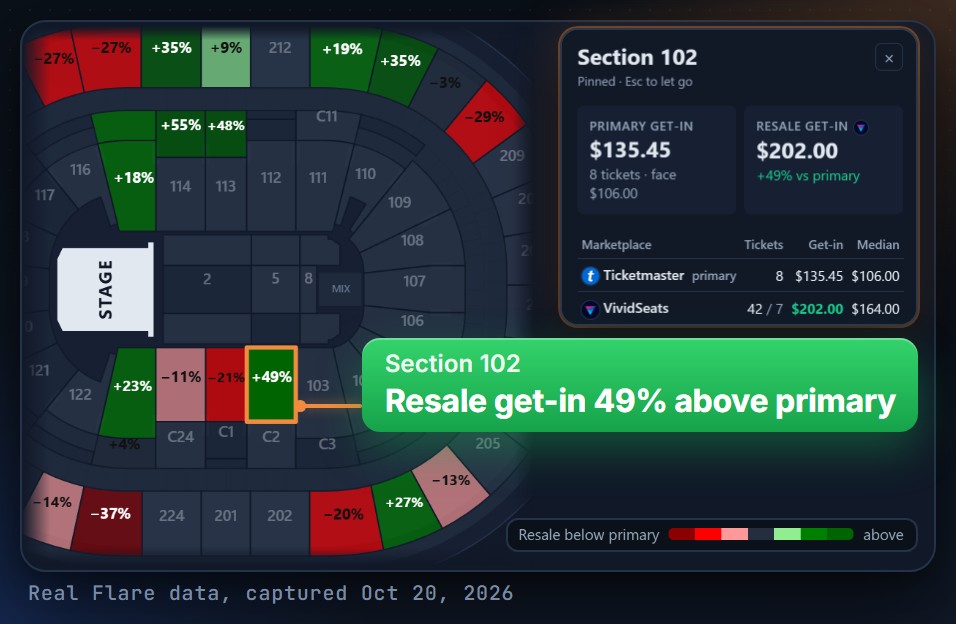
Compare resale and primary by section
Color the seat map by get-in, supply or the spread between resale and primary. Hover a section to see each marketplace.
Pro and up, on events with a seat map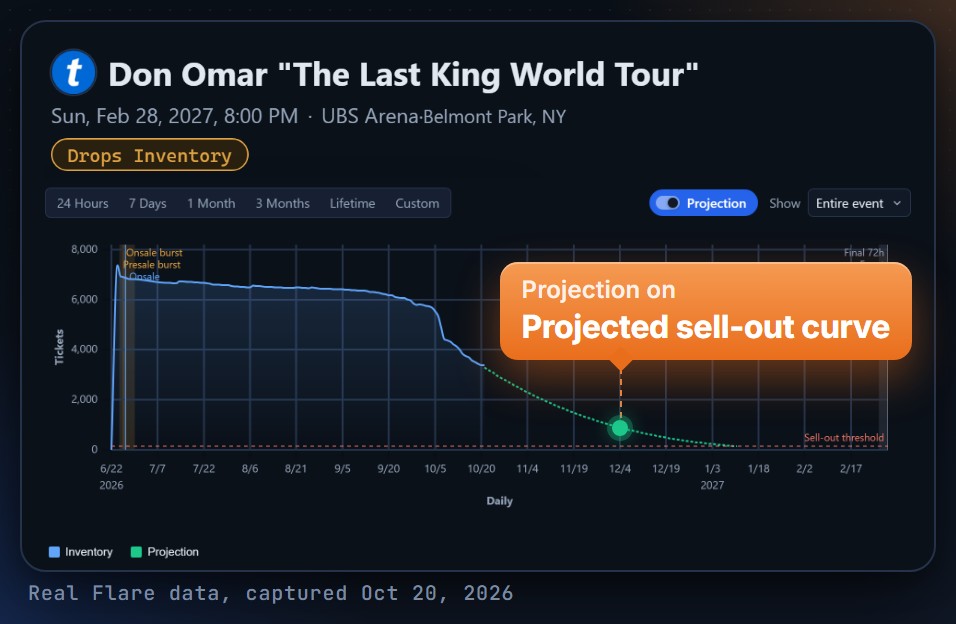
Switch on a projected sell-out curve
Flare draws the curve from the event's own tracked sales. It tells you when there is not enough data.
Ticketmaster and AXS. Not on every plan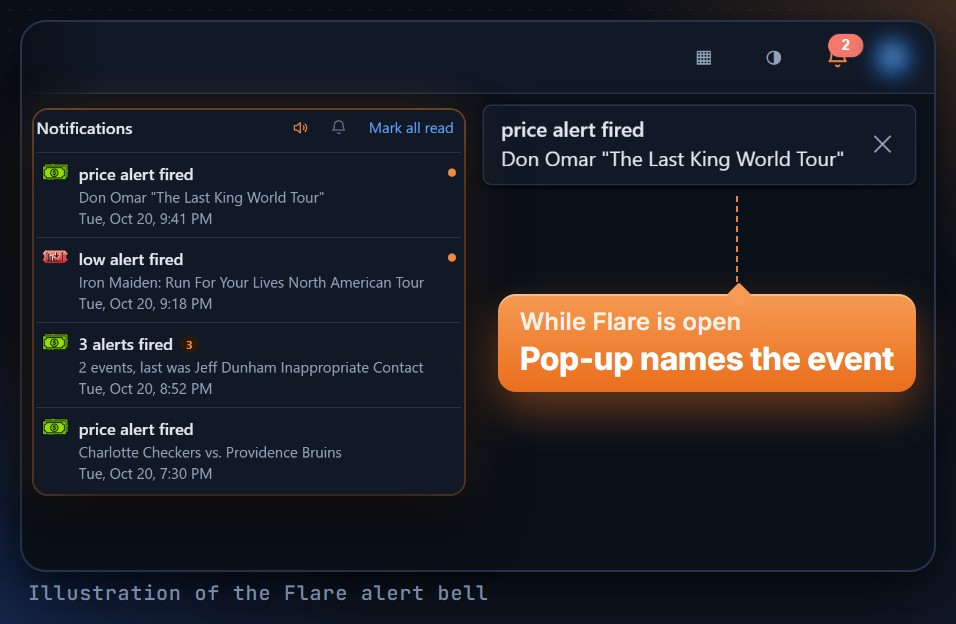
See triggered alerts on every Flare page
The alert bell lists the drop, low and price alerts that triggered in the last day. A pop-up names the event.
Expert and upAlso new in Flare
Saved views
Save your filters, columns and sort as a view. Set one to open by default.
Pro 1, Expert 5, Enterprise and up 15Search from any page
Press Ctrl+K (Cmd+K on a Mac) to find an event, venue or artist.
Every planTicketmaster sports events
Sports events on Ticketmaster are now tracked and searchable in Flare.
TicketmasterVenue and artist alerts
Follow a venue or an artist. Flare sends you a Slack or email message when a new show is announced.
Pro and upConnect your AI agent to Flare.
API access and MCP now come with Expert and up. The API used to start on Enterprise Adv at $999/mo. Now it starts on Expert at $189/mo.
- Connect Claude Code, Cursor, Codex or another AI agent
- Ask it to check your favorites, look up an event or set up alerts
- Pull Flare data into your own scripts and spreadsheets with the API
- Limits go up on higher plans, and Enterprise Adv has the highest
- 1Open the account menu in FlareClick Connect your Agent.
- 2Copy the message it showsPaste it into your AI agent.
- 3Ask in plain EnglishIt reads your Flare data and can set alerts for you.
Your personal 10-year ticket broker, ready 24/7.
We trained our AI model on every question, issue, and event we've seen in the past decade. Ask anything about pricing strategy, POS rates, presale tactics or season ticket methods, and get an expert answer instantly.
- Trained on 10+ years of broker knowledge
- Instant answers, day or night
- Pricing, season tickets, POS rates and more
- Built into every TicketFlipping membership

A community of professional brokers, in your pocket.
Every membership tier unlocks our Slack community so you can talk shop with other professional brokers and the TicketFlipping admins, anytime, anywhere. Higher tiers unlock private channels alongside brokers at your level.
- Live broker chat
- Admin support
- Tier-specific channels
- Mobile + desktop
Industry training built by 10-year operators
From your first event to scaling a brokerage, the Training Archive walks you through the methods we use ourselves.
- POS rates and percentages
- Season ticket methods
- Data-driven event research
- Recommended tools: Lysted, Automatiq, 1Ticket
Pick the plan that matches how you flip
Every plan includes the Flare dashboard, presale passwords, the Toolbox extension, the course, and Slack access. Step up tiers as your tracking, alert, and data needs grow.
All prices are monthly. Cancel anytime. API access and MCP now start on Expert.
For new brokers looking for training, event recommendations and the Ticket Counter.
- Flare Event Dashboard
- 15 Favorites (tracking)
- 45 daily Toolbox uses
- 10 Sold Data tracking
See all features
- Presale Passwords
- Venue and artist alerts for new shows
- Seat map by section
- Primary and secondary get-in
- Market Pulse (2 lists, top 3 each)
- Flare Score 1 to 100
- 1 saved view
- Ticketflipping Course
- Members Group (Slack)
- Price HeatMap (1 event/day)
- 1 AI Inquiry / day
For brokers who track events with Low and Drop alerts, plus API and MCP access.
- Drop, Low & Price Alerts
- API access + MCP for your AI agentNew
- 150 Favorites (tracking + alerts)
- 450 daily Toolbox uses
- 40 Sold Data tracking
See all features
- Everything in Pro
- Primary and secondary supply (Vivid Seats)
- Secondary sold data (Vivid Seats)
- Every Market Pulse list (50 rows)
- Bulk alerts
- 5 saved views
- Flare Event Dashboard
- Full Price HeatMap
- 20 AI Inquiries / day
- Members Group (Slack)
- Top Moving Events
- Presale Passwords
For larger brokers and businesses tracking many events with extensive sold data.
- 500 Favorites (tracking + alerts)
- Historical Data for past events
- 1,500 daily Toolbox uses
- 100 Sold Data tracking
See all features
- Everything in Expert
- API access + MCP
- Inventory change on All Events
- Market Pulse lists (100 rows)
- 15 saved views
- 50 AI Inquiries / day
- Drop, Low & Price Alerts
- Flare Event Dashboard
- Full Price HeatMap
- Members Group (Slack)
- Sold Out List
- Presale Passwords
For businesses that need the highest API limits, exclusive data, and the most favorites.
- Highest API limits + MCP
- Top Moving Event List
- Historical sales data on ALL events
- 2,500 Favorites (tracking + alerts)
See all features
- All lower-tier features
- 5,000 daily Toolbox uses
- 200 Sold Data tracking
- Full Price HeatMap
- 50 AI Inquiries / day
- Drop, Low & Price Alerts
Need something custom? See additional package options & custom requests →
Real results from real members
Since I added the Drop Alerts my sales have surged by a minimum of 40%, and profit has jumped at least 25-35% on those shows. Thanks so much guys - I should have upgraded a long time ago.

Ready to flip smarter?
Join the brokers who use TicketFlipping to spot demand earlier, price with real data, and stop leaving profit on the table.